Myself and the developers have decided to quit the enhancement and distribution of PC/OS PowerStation. PowerStation 2009 was the release of PC/OS for the PowerPC. Why was the decision made to quit the development of this release? The low demand for it and the lack of available software for PPC Linux. There just wasnt enough for me to offer a product on par with what the Open32 and Open64 line can deliver. Also, there was only one release and while the release worked well there just wasnt enough resources for me to continue development especially for the efika and Sam440 boards so for a good PowerPC desktop alternative I will start recommending Yellowdog Linux and for you folks with G3 iMacs I recommend Fedora 10. The Yellowdog and Fedora development teams have enough developers, experiences and resources to develop PowerPC releases and there just isnt much if anything PC/OS can bring to the table for that platform.
The G5 and the IBM POWER system have been returned to the donaters as I just didnt feel comfortable keeping those systems and not delivering a sustained product that targeted those systems and despite user intervention selling those systems on eBay just isnt my style.
So what about PC/OS for the PS3? That system is still under development and uses the Ubuntu PS3 build to build upon and that is still onging and will not be discontinued. while its not the focus build right now, its just something really cool to play with. The main focus right now is Open32 and Open64 series of PC/OS.
I do want to thank those that actually tried to help make PowerStation 2009 a success. When my G3 bit the dust two members of the community stepped forward and donated equipment and to those guys I want to say thank you.
So does this mean the PC/OS team will abandon PowerPC? Nope. I will continue to offer assistance with the development of PPC Linux to Fixstar and Fedora and yes I still play with PPC Linux a couple of the other PC/OS developers play with it as well.
Despite this bad news, I want to say Happy New Year and I look forward to the new year. Does this relect a change in delivery for OpenCore and Appliance? Nope. They will still be delivered on Jan 12, 2009 and Maintenance Pack 1 will be delivered on Jan 5, 2009.

Wednesday, December 31, 2008

Sunday, December 28, 2008
The state of Amiga
Well I decided to do a non-PC/OS related post here. This is about one thing that pisses me off more than anything. The Amiga. No its not the OS. The OS was solid and you still have users that use the system, are very happy with it in fact it has a more rabid user base than the Mac, Linux and even the RiscOS. The Amiga was an excellent system and I even had one years upon years ago and its one I wished I had actually kept. The reason for this post is simple. I had a user e-mail me and tell me the new UI changes remind him of the AmigaOS. I have also had users tell me that the UI changes remind them of the RiscOS etc, etc. It gets irritating after awhile but in this case it got me thinking. I do keep up with Amiga and what Amiga Inc. does.
The current state of Amiga sucks. On one side you have the community, including Hyperion who develops the AmigaOS, then you have Amiga Inc. The whole saga reeks of a bad soap opera and is equally confusing. Since 2001 you have Bill McEwen claiming you will see something in a few weeks. In every interview its going to be in a few weeks. Since 2001 he claims, "Look for the poing ball." Well I have been looking and I havent seen it. So wheres it at? As a business owner and a tech enthusiast if I had somebody running my company, spending the amount of money he does and after 8 years he has nothing to show, I would throw him out on his proverbial ass. Anyone who has a stake in Amiga needs to get the house in order. Who owns the AmigaOS? If MorphOS violates your IP, go after em.
Honestly, Im beginning to think the AmigaOS has reached the end of its road. Amiga Inc. has resorted to doing "cross platform" applications and has basically confused the situation regarding the AmigaOS.
To quote "Its time for a change"
The current state of Amiga sucks. On one side you have the community, including Hyperion who develops the AmigaOS, then you have Amiga Inc. The whole saga reeks of a bad soap opera and is equally confusing. Since 2001 you have Bill McEwen claiming you will see something in a few weeks. In every interview its going to be in a few weeks. Since 2001 he claims, "Look for the poing ball." Well I have been looking and I havent seen it. So wheres it at? As a business owner and a tech enthusiast if I had somebody running my company, spending the amount of money he does and after 8 years he has nothing to show, I would throw him out on his proverbial ass. Anyone who has a stake in Amiga needs to get the house in order. Who owns the AmigaOS? If MorphOS violates your IP, go after em.
Honestly, Im beginning to think the AmigaOS has reached the end of its road. Amiga Inc. has resorted to doing "cross platform" applications and has basically confused the situation regarding the AmigaOS.
To quote "Its time for a change"
Thursday, December 25, 2008
PC/OS 2009.1 to be shipped to final testing
PC/OS 2009.1 will be shipped to final beta testing on January 5th. The testing will be completed for a general release date of March 1, 2009. Releases will soon be coming few and far between. We are expecting a 2009.2 release around October 2009. With this release we tighten up everything visually, funtionality wise and yes, its tightened up. For starters Boot Up Manager is included in this release to cover run time configurations. No more sysv-rc-config on Workstation and Desktop. There is a new GDM and a new Usplash for those that were complaining about the old defaults. the icons have been tweaked as has the default wallpaper. The system has been totally updated. Some applications have been updated, some havent. Sylpheed is the new default client in the OpenDesktop release only, Fyre and Xaos have been added to the graphics offering on the OpenWorkstation release.
One reason for the slowdown in the 32 bit release is so we can concentrate on the x64 build and get that out the door.
Here are some screenshots of PC/OS 2009.1. A couple of UI changes. The top bar hosts the menu, notes app and the clipboard. The iconbox taskmanager, System tray, volume, date and time. The bottom bar is used as a launch surface for users to place their comonly used apps. Show desktop, System Navigator applet, the default apps will be Firefox, Mail Client, Terminal, desktop switcher and the trash applet.
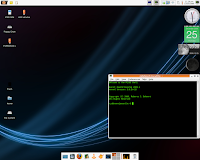
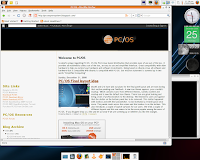

One reason for the slowdown in the 32 bit release is so we can concentrate on the x64 build and get that out the door.
Here are some screenshots of PC/OS 2009.1. A couple of UI changes. The top bar hosts the menu, notes app and the clipboard. The iconbox taskmanager, System tray, volume, date and time. The bottom bar is used as a launch surface for users to place their comonly used apps. Show desktop, System Navigator applet, the default apps will be Firefox, Mail Client, Terminal, desktop switcher and the trash applet.


Sunday, December 21, 2008
PC/OS Final layout idea

Myself and Cris have laid out plans for the final panel layout and are now closing that section pending user feedback. A new Icon theme appears. pcos-crashbit-mashup. Which contains icons from different themes, namely crashbit and mashup and is now the default icon theme. These icon are great looking and bring a look of professionalism to the desktop. We listened to users and agreed that the clutter on the bottom panel has to be removed. This clutter happened with iconbox and with the taskswitcher. So we instituted a 2 Panel layout once more. The panels reach across the screen and the iconbox is on the bottom. This also introduces a couple of launch surfaces for our users. We tried a couple of different layouts and this one seems to be the more popular among the users of PC/OS. if you disagree drop us a line and let us know if we are screwing up or whether you like the changes.
Friday, December 19, 2008
PC/OS Development team and the Holidays

Alright everyone. The PC/OS development team is taking the holiday season off. All build servers and upload servers are going down at 12:00pm on December 19Th and wont be back on until Jan 2ND 2009. I want to wish everyone a great Christmas and happy new year and we all will be back next year, meaning Jan 2009, so.....
Merry Christmas, Happy Hanukkah, whichever applies.
PC/OS 2009.1 Some new apps

OK guys, I went ahead and checked off some of the upcoming with PC/OS 2009. There are a couple of new apps, scratch Orage. Osmo makes a comeback after all this time. Liferea also makes a comeback and debuting is Sylpheed 2.5.0.
Also we changed the main menu a little. We added a root file manager. We also added quick links to web and e-mail and a link to creating a new mail quickly. This will be for Open32 Desktop and Sylpheed and more than likely not for Thunderbird in Open32 Workstation.

Thursday, December 18, 2008
PC/OS Appliance and OpenCore 2.0
A lot of Appliance customers have asked me about PC/OS Appliance and the status of that project. PC/OS Appliance and OpenCore now have the same delivery date, January 5th 2009. Why did I move it up? Testing and update testing. As soon as I was ready to release Appliance, a kernel update came out and updates came out so they are being tested. Some of the feature changes in PC/OS Appliance include the new interface design and wallpaper as well as the Array.org kernels will be included for installation. Opencore is really shaping up. Some client implementations include, Burn servers, NAS implementations and standard web servers. I am interested to see how much further they will take it with release 2.0.
I was really digging Claws Mail. I started using Sylpheed because of csv support and the fact I cant just do without my addressbook. I have been using it instead of Thunderbird. Im still testing and right now it seems to be an awesome client. A how-to will be provided for gmail configuration
I was really digging Claws Mail. I started using Sylpheed because of csv support and the fact I cant just do without my addressbook. I have been using it instead of Thunderbird. Im still testing and right now it seems to be an awesome client. A how-to will be provided for gmail configuration
Tuesday, December 16, 2008
Changes for PC/OS Open32 Desktop
Because of the size restriction for the CD edition a few changes had to be made for Open32 Desktop. Wine is no longer bundled but it will be included on the add-ons ISO. I also had to remove Mozilla Thunderbird but its downloadable from the repsoitories as is lightning. To replace lightning I included Orage. Thunderbird was replaced with Claws Mail. I chose Claws because as with Thunderbird it has good support for Gmail and is easier to use than Sylpheed. I also changed the Desktop Icon texts and labels. The labels are now black and transparent and the text is white. The labels are dark enough so if you have a light or white background you can still see the text
Aside from these few changes and the applied updates not much has changed.
Aside from these few changes and the applied updates not much has changed.
Friday, December 12, 2008
Taskbar changes in PC/OS 2009.1
There are a couple of changes that we are looking into for PC/OS 2009.1 for the taskbar. We want to add more real estate for the taskbar so we are implementing 1 definate change. The removal of the trash can. There are 2 other surfaces for accessing and manipulating the trashcan. One is the desktop, the other is the thunar file manager. So we thought to eliminate the surface least used by users and the one we notice is removed on 90% of the deployments we have seen, the taskbar. The applet will still be available for use by those users who decide that they still want it. 
Secondly we have removed the tasklist and put in Iconbox. Iconbox is pretty functional by itself and offers a more visual appearance to the running tasks. Minimized tasks are greyed out and the active windows has a bright icon with a border around it. This also helps distinguish from tasks not minimized but not active.
As you can see to remove some of the confusion regarding Iconbox and launchers we have placed Iconbox on the far right and the launchers on the far left along with the menu and the Places applet with a clear seperation. Also, when you close windows the Iconbox shrinks and disappears. While this change will be welcome by some, not all will like it so we are still including the tasklist for those that want to go back to the old ways.

The next question regarding the Icon box is, what happens if I have multiple Firefox windows open, how can I distinguish? when you hover above the icon a pop up tells you what page you are currently working with. If you are viewing a document in ePDFview or editing multiple Abiword or writer documents, the document title appears in the pop-up. We are also looking at enabling grouping with the applet so that users will be able to click on the icon and get a list of whats open. This is a feature being worked on and is not currently built into Iconbox.
Finally, what type of Window manipulation can be performed with Iconbox? We dont have Open dialogs, this would be too much like Windows 7 jump lists which we are sure are patented by Microsoft. Currently you can close windows, shade windows, hide windows, move to another desktop etc. This is the extent of Iconbox and we will continue testing and doing usablity tests with beta testers to see if the changes increase productivity and usability. if not we will stay with the current setup if it proves to be too daunting for users to "pick up on". The development team and the current users of this setup like the changes and think the most of them but once again, the broader the testing the more feedback we get.
We are continuing to refine PC/OS and hope that you, our loyal users, will be just as happy with the setup as we are. Considering PC/OS 2009.1 will only be available for download via Open32 Desktop, we do want to make sure users of Workstation are getting the most bang for their buck.
These changes will also debut in the Open64 series.

Secondly we have removed the tasklist and put in Iconbox. Iconbox is pretty functional by itself and offers a more visual appearance to the running tasks. Minimized tasks are greyed out and the active windows has a bright icon with a border around it. This also helps distinguish from tasks not minimized but not active.
As you can see to remove some of the confusion regarding Iconbox and launchers we have placed Iconbox on the far right and the launchers on the far left along with the menu and the Places applet with a clear seperation. Also, when you close windows the Iconbox shrinks and disappears. While this change will be welcome by some, not all will like it so we are still including the tasklist for those that want to go back to the old ways.

The next question regarding the Icon box is, what happens if I have multiple Firefox windows open, how can I distinguish? when you hover above the icon a pop up tells you what page you are currently working with. If you are viewing a document in ePDFview or editing multiple Abiword or writer documents, the document title appears in the pop-up. We are also looking at enabling grouping with the applet so that users will be able to click on the icon and get a list of whats open. This is a feature being worked on and is not currently built into Iconbox.
Finally, what type of
 Window manipulation can be performed with Iconbox? We dont have Open dialogs, this would be too much like Windows 7 jump lists which we are sure are patented by Microsoft. Currently you can close windows, shade windows, hide windows, move to another desktop etc. This is the extent of Iconbox and we will continue testing and doing usablity tests with beta testers to see if the changes increase productivity and usability. if not we will stay with the current setup if it proves to be too daunting for users to "pick up on". The development team and the current users of this setup like the changes and think the most of them but once again, the broader the testing the more feedback we get.
We are continuing to refine PC/OS and hope that you, our loyal users, will be just as happy with the setup as we are. Considering PC/OS 2009.1 will only be available for download via Open32 Desktop, we do want to make sure users of Workstation are getting the most bang for their buck.
These changes will also debut in the Open64 series.
Thursday, December 11, 2008
First Image: PC/OS Open64

Well guys here is the very first image of a booting PC/OS Open64 Workstation. Alot of work needs to be done to bring it up to par with the 32 bit release.
This is not a process that will be completed overnight and it will take months of testing and refinement. A public beta will be made available as time permits probably in another month or so for feedback and I reitirate the 32 bit release will not go away. In fact to keep the release distinguishable we are considering renaming OpenWorkstation, OpenServer System and OpenDesktop to Open32 Workstation, Open32 Desktop and Open32 Server.
Monday, December 8, 2008
Trimming the fat
In regards to PC/OS 2009.1 we have found several packages that can be removed safely and without causing system instability. I discovered a majority of these working on OpenCore 2.0 which has shrunk by the way by over 100mb. Anyhow, since PC/OS 2009.1 is mainly an update and cleanup release trimming the fat is one of the must do's for the release. More info is forthcoming.
The new default theme for PC/OS

The background stays the same, the icons stay the same. The theme and window theme change. Here is a screenshot.
Sunday, December 7, 2008
Planning for PC/OS
Well guys due to popular demand the user interface for PC/OS will not be changing at all. Opta 3 and Ubuntulooks seem to be more popular than Nodoka and Gilouche so it will be staying put and this is final. We hit the user interface on the head so now its time to move on.
To bolster revenue and to make the site more manageable, the developers blog will probably become the new home page. This way it bolsters ad revenue and also makes everything a little more organized. The plans for this are in the works so stay tuned. I was thinking of doing a customized web page on linuxfreedom.org but it just seems a lot of work to redesign the site juts so I can through in Google AdSense. We will also introduce a Wiki for PC/OS sooner than later.
Right now Im in a hotel in Atlanta Ga, so some of these plans will have to wait until I get home.
To bolster revenue and to make the site more manageable, the developers blog will probably become the new home page. This way it bolsters ad revenue and also makes everything a little more organized. The plans for this are in the works so stay tuned. I was thinking of doing a customized web page on linuxfreedom.org but it just seems a lot of work to redesign the site juts so I can through in Google AdSense. We will also introduce a Wiki for PC/OS sooner than later.
Right now Im in a hotel in Atlanta Ga, so some of these plans will have to wait until I get home.
Saturday, December 6, 2008
PC/OS on Linux.com
Well guys I was surprised to be pointed to an article on PC/OS that was published on Linux.com. It was a great review and the reviewer liked it. When the e-mailer, Louis, a PC/OS developer sent the the words "read Linux.com" I got a little nervous. So I read it and as always I make the mistake of reading the comments. Some were negative, some were OK. Take the bad with the good. I want to take this oppurtunity to congratulate the developers of the distro. Cris Molina, Louis Davis, Danielle Adams, Mike Vale and of course myself. Louis and Danielle are part time as they have regular 9 to 5's that they report to but their contributions are important nonetheless. Sandra and Ryan Flynn are also regular beta testers and dont hold back their opinions. When something sucks they tell me.
We have some exciting plans down the line and hopefully the next go around will be better and while taking in the feedback that our users offer.
So everyone, pat yourselves on the back and lets get back to work. We still have a long way to go to show that we arent just a common remaster, that this distribution has a purpose.
We have some exciting plans down the line and hopefully the next go around will be better and while taking in the feedback that our users offer.
So everyone, pat yourselves on the back and lets get back to work. We still have a long way to go to show that we arent just a common remaster, that this distribution has a purpose.
Tuesday, December 2, 2008
PC/OS OpenServer System 8.3 released
Today we are pleased to announce the release of PC/OS OpenServer System 8.3.
This release is our small business/home office server offering and functions best in that capacity.
This release updates the PC/OS OpenServer System 2008 series.
Some of the packages that are included with this release
The full LAMP stack, unlike previous releases where MySQL, PHP were released in a seperate package in PC/OS OpenServer System 8.3 its provided by default.
Webmin 1.441
OpenLDAP directory service
Likewise Fall Edition
Kickstart
Cluster configuration tools.
Simple Backup
With this new release we also fixed the issue of install quitting at 15% of partitioning due to the Logical Volume Management utility.
Known Issues:
The mysql server is locked with a password. The username is root password is pcos. A sidenote, the system root account is not enabled this is just for mysql server.
udevd look_up group 'scanner': group not found: This error occurs multiple times in the install media and is caused by the master process, the error looks scary but the boot sequence will continue. This error is not a performance inhibitor. If you wish not to see it on your installed system when you login type 'sudo groupadd scanner' and this will clear the error up. We are looking at clearing this error up for PC/OS OpenServer System 8.4
PC/OS OpenServer System 8.3 can be downloaded from the download page.
This release is our small business/home office server offering and functions best in that capacity.
This release updates the PC/OS OpenServer System 2008 series.
Some of the packages that are included with this release
The full LAMP stack, unlike previous releases where MySQL, PHP were released in a seperate package in PC/OS OpenServer System 8.3 its provided by default.
Webmin 1.441
OpenLDAP directory service
Likewise Fall Edition
Kickstart
Cluster configuration tools.
Simple Backup
With this new release we also fixed the issue of install quitting at 15% of partitioning due to the Logical Volume Management utility.
Known Issues:
The mysql server is locked with a password. The username is root password is pcos. A sidenote, the system root account is not enabled this is just for mysql server.
udevd look_up group 'scanner': group not found: This error occurs multiple times in the install media and is caused by the master process, the error looks scary but the boot sequence will continue. This error is not a performance inhibitor. If you wish not to see it on your installed system when you login type 'sudo groupadd scanner' and this will clear the error up. We are looking at clearing this error up for PC/OS OpenServer System 8.4
PC/OS OpenServer System 8.3 can be downloaded from the download page.
Subscribe to:
Posts (Atom)